Wireless Gasket-Mount RGB Keyboard with Wrist Rest
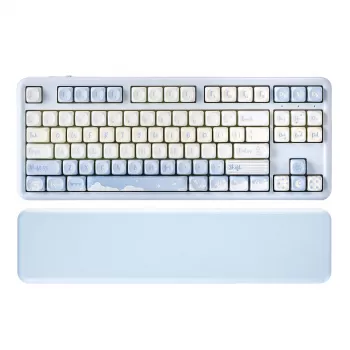
Wireless Mechanical Gaming Keyboard with RGB, Gasket Mount & Wrist Rest
A wireless mechanical keyboard can tidy up a gaming setup without losing the crisp feedback and fast actuation that make mechanical switches a favorite. The Wireless Mechanical Gaming Keyboard with RGB, Gasket Mount & Wrist Rest pairs cable-free convenience with per-key style lighting, a gasket-mounted structure for a softer, more controlled keypress, and a wrist rest designed to keep long sessions comfortable. The result is a more premium desk experience that’s equally at home in gaming, schoolwork, and everyday typing.
What Makes This Keyboard Different
Some keyboards focus on one headline feature—wireless, RGB, or sound—then leave the rest as an afterthought. This model is built around how the keyboard feels and behaves hour after hour.
- Wireless convenience to reduce desk clutter while keeping a gaming-ready layout.
- Gasket mount construction intended to soften harsh bottom-out and reduce vibration transfer into the case.
- RGB lighting that improves visibility in low light and helps match the rest of a setup.
- Included wrist rest for better support during long play sessions or work blocks.
- Balanced daily use for gaming, emails, spreadsheets, and late-night chats where comfort matters.
Wireless Performance: What to Look For Day to Day
Wireless is only “set-and-forget” when the connection stays stable. Small placement choices can make a big difference, especially in crowded USB environments.
- Prioritize stability for competitive play. Keep the receiver (or paired device) nearby with as clear a path as possible.
- Use wired mode when it counts. Wired is helpful while charging and is often required for tournaments or LAN settings.
- Reduce interference. Avoid hiding the receiver behind dense metal objects (like the back of a PC case), and keep it away from busy USB 3.x hubs when possible. USB specifications and behavior vary by device and port design, so good placement is a practical first step. Reference: USB-IF: USB Specifications.
- Use Bluetooth strategically. Pair Bluetooth with the device that needs portability most (laptop/tablet), and save the lowest-latency option for gaming. For background on Bluetooth versions and compatibility, see Bluetooth Core Specification Overview.
Gasket Mount Feel and Sound: Why It Matters
Gasket mounting is a build approach that typically separates the plate/PCB assembly from the outer case using soft mounting points. Instead of every keystroke transferring sharply into the chassis, the assembly has a bit of “give,” which changes both feel and sound.
- Less harsh bottom-out. Keystrokes can feel less rigid, especially during repeated presses in action-heavy games.
- Reduced vibration and ping. By isolating the internals from the case, a gasket mount often lowers hollow resonance and case noise.
- More consistent sound profile. Many users notice a more even, muted tone across the board compared with hard tray-mounted designs.
- Best results come from the full package. Stable keycaps and properly tuned stabilizers can amplify the “solid” feel—so if a key ever starts sounding off, reseating keycaps and checking stabilizers is a smart first fix.
RGB Lighting That’s Practical, Not Just Decorative
RGB is easy to dismiss as pure aesthetics, but it can be genuinely useful. The trick is choosing effects that help visibility and focus without draining the battery unnecessarily.
- Match brightness to the moment. Use brighter profiles for late-night play, and dimmer static modes for less distraction and better battery life.
- Consider a single-color competitive preset. A consistent color can improve readability and reduce visual noise in fast titles.
- Use lighting as a “connection check.” If you switch between devices, a specific preset can make it obvious which device profile is active.
- Reduce webcam flicker. Lowering intensity or turning off animated effects can minimize background light changes during voice chat or streaming.
Wrist Rest Comfort: Getting the Setup Right
- Support palms lightly. Rest the base of the palms on the pad and avoid pressing down directly on the wrists during movement-heavy games.
- Keep elbows and shoulders relaxed. Ideally, elbows sit roughly level with the desk surface to avoid shrugging or reaching.
- Adjust chair height before adding extra padding. If the desk is high or the chair is low, posture fixes beat stacking accessories.
- Take short breaks. Even a great wrist rest can’t replace periodic movement. For workstation ergonomics fundamentals, see OSHA Computer Workstations eTool.
Quick Comparison Checklist
Feature Checklist for a Wireless Gasket-Mounted RGB Keyboard
| Feature | Why it matters | Setup tip |
|---|---|---|
| Wireless connection | Less cable clutter and easier multi-device use | Keep receiver close; avoid placing it behind the PC case |
| Wired option | Stable play and charging flexibility | Use wired mode for updates and long sessions |
| Gasket mount | Softer feel and reduced vibration | Pair with a firm desk mat to stabilize the sound |
| RGB lighting | Visibility and personalization | Lower brightness to extend battery life |
| Wrist rest | More comfortable hand angle for long sessions | Support palms lightly; don’t bend wrists upward |
Care, Charging, and Long-Term Maintenance
Who This Keyboard Fits Best
Also In Stock
- Luxury Large Capacity Bowling Shoulder Bag with Sausage Dog Pendant
- 2-3 Person Low EMF FAR Infrared Sauna with Tempered Glass and App Control
FAQ
Is a gasket-mounted keyboard better for gaming?
A gasket mount mainly changes feel and sound by making keypresses softer and reducing vibration, which can improve comfort during long sessions. For competitive performance, connection stability, switch choice, and consistent actuation matter more than the mounting style.
Does RGB lighting drain the battery quickly on wireless keyboards?
It can, especially with bright or animated effects. Dimming brightness, using static colors, or turning lighting off when not needed typically extends time between charges.
How should a wrist rest be used for comfort?
Rest your palms lightly and aim to keep wrists in a neutral position rather than bent upward. Adjust chair and desk height first when possible, and take short breaks during long sessions to reduce strain.







Leave a comment